How to Run an Influencer Seeding Campaign on Shopify
A step-by-step guide to product seeding for Shopify brands: picking creators, choosing what to send, getting sizes and addresses, shipping, disclosure and tracking what comes back.
Colton Sims · November 26, 2026 · 4 min read
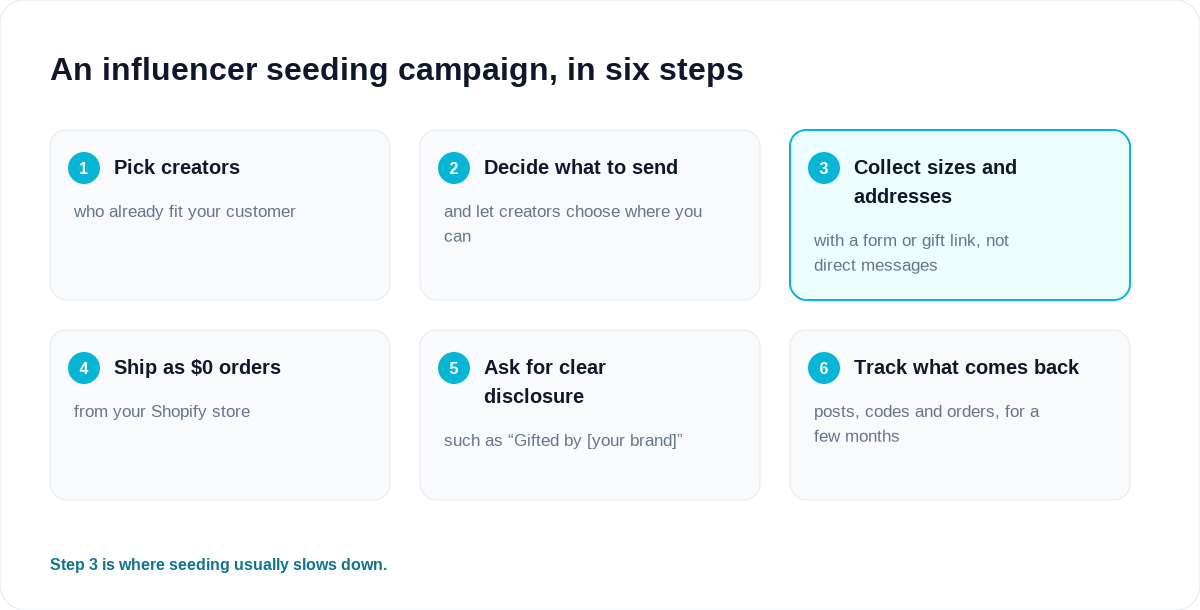
Influencer seeding means sending free product to creators with no payment and no obligation to post, in the hope that some of them like it enough to share it. For a Shopify brand, a campaign comes down to six steps: pick the creators, decide what to send, collect sizes and addresses, ship, ask for proper disclosure, and track what comes back.
The step that eats the most time is usually the third one. Messaging dozens of creators for their size, shade and address, then typing it all into orders, is where most seeding programs slow down. This guide covers all six, with the options for each.
1. Pick creators who already fit your customer
Seeding works best with creators whose audience already looks like your customer, not just the ones with the biggest follower counts. A smaller creator whose followers are exactly your customers can do more for you than a large general audience.
Places to find them:
- Your own customers and followers. People who already tag you are the warmest list you have.
- Hashtags and competitors' tagged posts on Instagram and TikTok.
- Creator platforms if you're seeding at volume, such as GRIN, or the Shopify Collabs app if you already have connections there.
Keep a simple list: name, handle, platform, why they fit, and what you plan to send.
2. Decide what to send
Send a product that shows well on camera and that the creator would actually use. Our guide to what to put in an influencer seeding kit goes into detail, but two rules matter most:
- Send what fits them. A shade, size or flavor that doesn't suit the creator rarely gets posted.
- Let them choose where you can. Letting creators pick from a small set of products tends to produce gifts they actually use, and it removes a round of back-and-forth messages.
3. Collect sizes and addresses without the DMs
This is where seeding usually stalls. The common approaches, from most manual to least:
| Approach | How it works | Trade-off |
|---|---|---|
| Direct messages | Ask each creator for size and address, then create orders by hand | Free, but slow and easy to get wrong at any volume |
| A form | Send a form, then copy answers into draft orders | Less messaging, still manual order entry |
| A gifting app | Send a link; the creator picks products and enters their address; the order is created for you | Fastest, and the creator's choices come straight into your store |
Shopify apps that work this way include GiftForm, Influencer Gifting Form by Revtools, Seeding Ops, Kynship, GRIN and CareCreator. They differ in whether the creator can pick the product or only the size, and in how the order is created.
4. Ship as zero-dollar orders from your store
However the details are collected, each gift should end up as a $0 order in Shopify so inventory, fulfillment and tracking work the way they do for paid orders. You can do this with draft orders, 100% discount codes or a gifting app. Our guide on how to send free products from Shopify compares the three, including how each shows up in your reports.
Decide up front whether you're covering shipping. Most brands do, since asking a creator to pay for a gift's shipping undoes the gesture.
5. Ask for clear disclosure
The FTC treats a free product as a "material connection," so creators who post about a gift should disclose it, even if you never asked them to post. A bare "#gifted" may not be enough. "Gifted by [your brand]" or "Thanks to [your brand] for the free product" is clearer. The FTC also expects brands to tell creators about disclosure and keep an eye on the posts.
Our guide to gifted products and the FTC covers the wording, placement and what the brand is responsible for.
6. Track what comes back
Seeding has no guaranteed return. Some creators post, many don't, and the FTC's own guidance treats gifting with no requirement to post as normal. In a 2023 Traackr survey of more than 300 marketers, 65% said their brand would send product to an influencer even if that creator didn't post after a previous gift.
What to track for each creator:
- Did they post? Watch for tags and mentions for a few months, not just the first week.
- Was it disclosed properly?
- Did it drive anything? A personal discount code or a tracked link shows sales. Repostable content is a win of its own.
- Would you send again? Creators who post and fit well are your best list for the next round.
Common questions
Do creators have to post about a seeded product? No. Seeding usually comes with no obligation to post. If they do post, they should disclose that the product was free.
How many creators should I seed at once? Start with a batch small enough to follow up with personally, then grow it once you know which creators and products work.
Should I include a discount code for their followers? It helps you measure sales from each creator. Keep it optional, so the gift doesn't feel like a sales ask.
Do I need an app? No. You can seed with direct messages and draft orders. An app starts to pay off when typing sizes and addresses into orders takes more time than you have.